
Introduction to PHP
Back in 1994, Rasmus Lerdorf unleashed the very first version of PHP. However, now the reference implementation is now produced by The PHP Group.
The term PHP originally stood for Personal Home Page but now it stands for the recursive acronym: Hypertext Preprocessor. PHP 4 and PHP 5 are distributed under the PHP Licence v3.01, which is an Open Source licence certified by the Open Source Initiative.
PHP runs on all major operating systems, from Unix variants including Linux, FreeBSD, Ubuntu, Debian, and Solaris to Windows and Mac OS X. It can be used with all leading web servers, including Apache, Microsoft IIS, and the Netscape/iPlanet servers.
PHP has built-in support for generating PDF files, GIF, JPEG, and PNG images, and Flash movies.
One of PHP’s most significant features is its wide-ranging support for databases. PHP supports all major databases (including MySQL, PostgreSQL, Oracle, Sybase, MS-SQL, DB2, and ODBC-compliant databases), and even many obscure ones.
Even the more recent NoSQL-style databases like SQLite and MongoDB are also supported. With PHP, creating web pages with dynamic content from a database is remarkably simple.
Finally, PHP provides a library of PHP code to perform common tasks, such as database abstraction, error handling, and so on, with the PHP Extension and Application Repository (PEAR). PEAR is a framework and distribution system for reusable PHP components.
Where is PHP used?
Three are the main areas where PHP scripts are used:
Server-side scripting
This is the most used and main target for PHP. You need three things to make this work the way you need it. The PHP parser (CGI or server module), a web server and a web browser. You need to run the web server where. You can access the PHP program output with a web browser, viewing the PHP page through the server. All these can run on your home machine if you are just experimenting with PHP programming.
Command line scripting
You can make a PHP script to run it without any server or browser. You only need the PHP parser to use it this way. This type of usage is ideal for scripts regularly executed using cron (on Linux) or Task Scheduler (on Windows). These scripts can also be used for simple text processing tasks.
Writing desktop applications
PHP may not the very best language to create a desktop application with a graphical user interface, but if you know PHP very well, and would like to use some advanced PHP features in your client-side applications you can also use PHP-GTK to write such programs. You also have the ability to write cross-platform applications this way.
Why PHP?
There stand convincing arguments for all those who wonder why PHP is so popular today.
Compatible with almost all servers used nowadays
A web server is an information technology that processes requests via HTTP, the basic network protocol used to distribute information on the World Wide Web. There exist many types of web servers that servers use. Some of the most important and well-known are: Apache HTTP Server, IIS (Internet Information Services), lighttpd, Sun Java System Web Server etc. As a matter of fact, PHP is compatible with all these web servers and many more.
PHP will run on most platforms
Unlike some technologies that require a specific operating system or are built specifically for that, PHP is engineered to run on various platforms like Windows, Mac OSX, Linux, Unix etc)
PHP supports such a wide range of databases
An important reason why PHP is so used today is also related to the various databases it supports (is compatible with). Some of these databases are: DB++, dBase, Ingres, Mongo, MaxDB, MongoDB, mSQL, Mssql, MySQL, OCI8, PostgreSQL, SQLite, SQLite3 and so on.
PHP is free to download and open source
Anyone can start using PHP right now by downloading it from php.net. Millions of people are using PHP to create dynamic content and database-related applications that make for outstanding web systems. PHP is also open source, which means the original source code is made freely available and may be redistributed and modified.
Easy to learn & large community
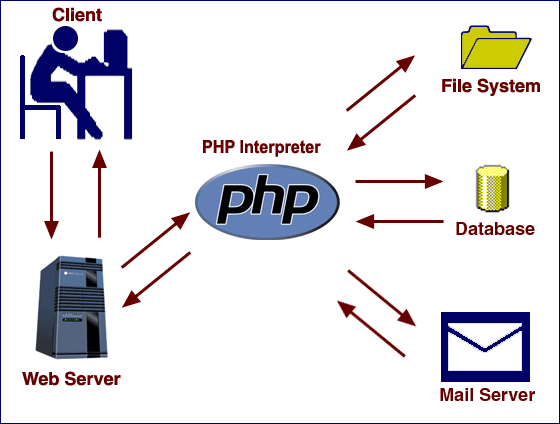
PHP is a simple language to learn step by step. This makes it easier for people to get engaged in exploring it. It also has such a huge community online that is constantly willing to help you whenever you’re stuck (which actually happens quite a lot). The graphic below shows a basic workflow of dynamic content being passed to and from the client using PHP.
How Does PHP Work?
As Previously mentioned that PHP is a server-side programming language which means it runs in the server. PHP plays an intermediate role between a client and the date stored in the server and other servers.
What Do You Need to Start Using PHP?
- Install a Web Server (XAMPP, WAMP, or alternatives)
- Install PHP
- Install a database, such as MySQL